Trigr
No-code hotkeys, macros & text expansion for Windows.
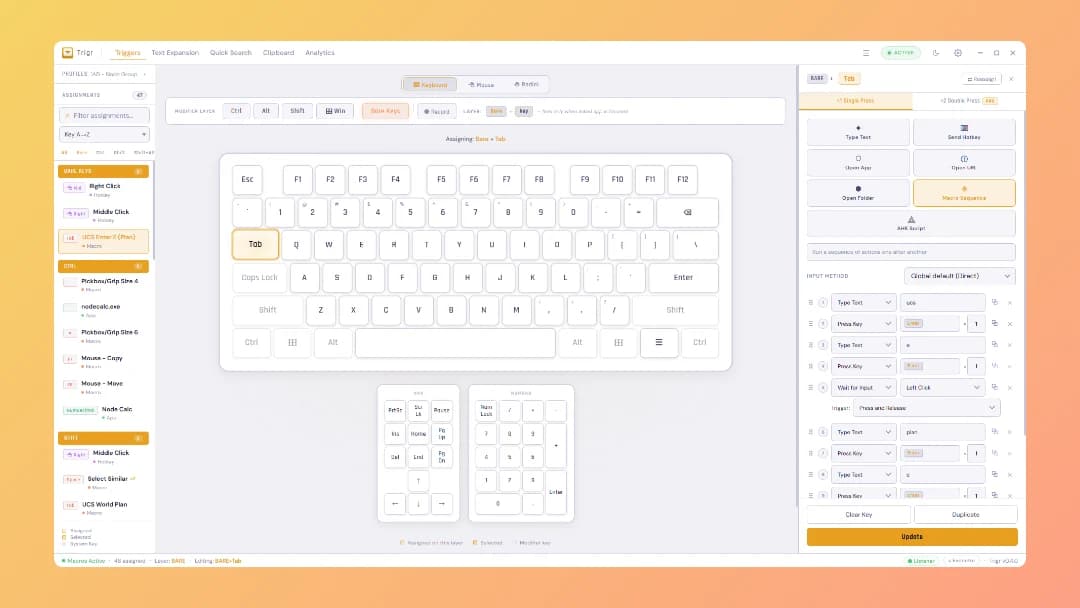
Trigr turns the keyboard and mouse you already own into a programmable workspace — without writing a single line of code.
Most Windows automation tools force you into scripting. AutoHotkey wants you to learn a language. Power users get it, but the other 95% of people who'd benefit — project managers, architects, engineers, anyone who types the same thing fifty times a day — bounce off.
Trigr fixes that. Everything is visual. Click a key on the on-screen keyboard, drag in actions, done.
WHAT YOU CAN DO
- Hotkeys — Trigger anything from any key combination, including mouse buttons. Single press, double press, or hold variants.
- Macros — Chain keystrokes, mouse clicks, app launches, URL opens, folder opens, and window focus into one trigger.
- Text expansions — Type ";addr" and it expands into your full address. Supports fill-in variables for templates.
- Clipboard manager — Searchable history of everything you've copied, with pinning and quick paste.
- Search overlay — Quick launcher for templates, snippets, and URLs.
BUILT FOR REAL WORK
Trigr lives in your system tray, starts with Windows, and stays out of your way. It's not a launcher trying to replace your OS. It's a small, fast utility that takes the friction out of repetitive desktop tasks.
- Native Windows app (Tauri + Rust) — light on memory, no Electron bloat
- Works on x64 and ARM64
- Light and dark themes
- Pause/resume globally with a single hotkey
WHO IT'S FOR
If you've ever thought "I do this five times a day, there has to be a faster way" — but didn't want to spend a weekend learning a scripting language to fix it — Trigr is for you.
Currently in alpha. Beta opens soon.
Buyer Guides
Where Trigr fits in current buying guides
These pages narrow the broader category down into specific comparison jobs and help you evaluate buyer fit more directly.
Explore
More paths around Trigr
Use Productivity, tag, and alternatives pages when you want a broader comparison set around Trigr.