AI Real Estate Video From Photos: How to Turn a Listing Gallery Into a Video With ShowcaseVideos.ai
Listing video helps buyers picture a home, but most agents skip it. A videographer costs hundreds of dollars per listing and takes days, and editing a video yourself takes hours. So most listings go live with a photo gallery, and the empty rooms in it look like problems rather than homes.
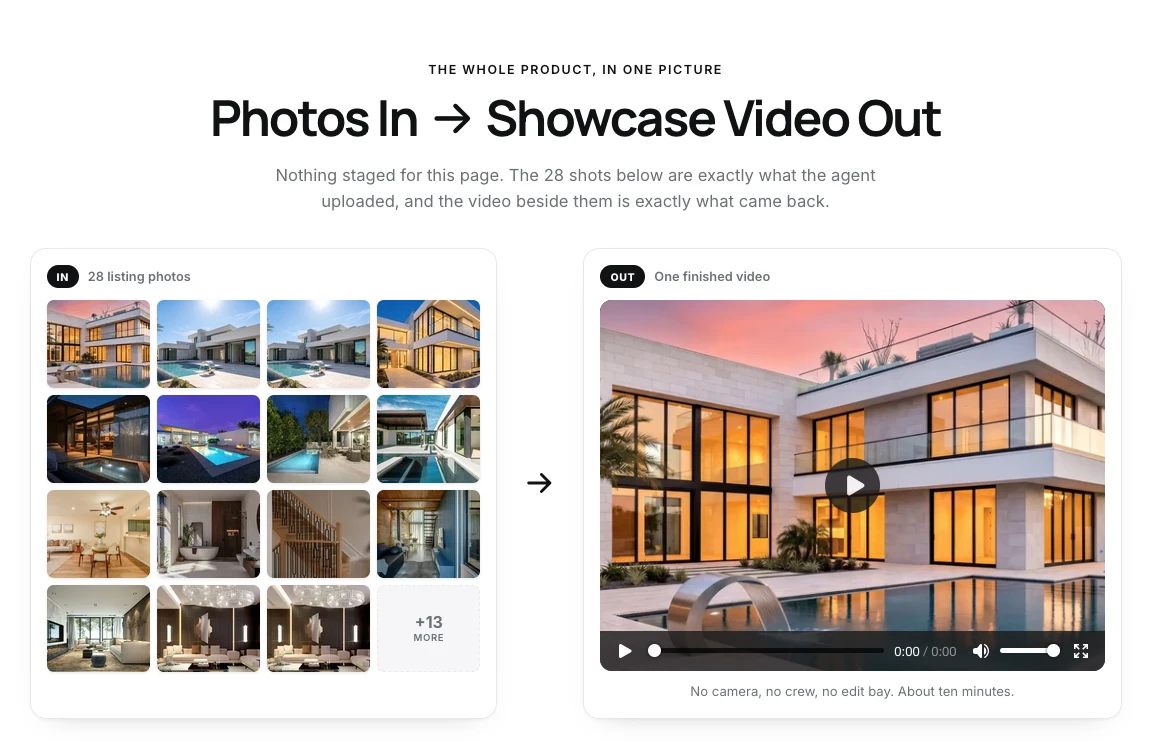
An AI real estate video built from photos skips the shoot. You start with the listing photos you already have, and the software adds camera motion, stages empty rooms and cuts the result to length. ShowcaseVideos.ai does this in about ten minutes, guided by a chat assistant instead of an editing timeline. This guide covers how it works, how to prepare the photos and where the method stops working.
What AI adds to a still photo
A photo-based listing video is more than a slideshow with music. ShowcaseVideos.ai does five things to the photos:
- Camera motion on hero shots. AI motion moves through the strongest frames, so the video shows a sequence of rooms rather than a grid of pictures.
- Virtual staging for empty rooms. An empty room gets furnished before the camera moves through it, in a style matched to the property. Rooms you don't mark render exactly as photographed.
- An address bar. The street address sits along the bottom of the video. You can add the city and asking price, or switch the bar off for a pocket listing. A price change is a re-render, not a re-shoot.
- Music. Cleared library music is included, with an optional original score composed to the video's length.
- Every format from one build. Landscape (16:9) for the MLS, your website and YouTube; vertical (9:16) for Reels, TikTok and Stories; square (1:1) for feed posts. Each is cut to fit rather than cropped.
Three ways to make a listing video
| Shoot it yourself | Hire a videographer | AI video from photos | |
|---|---|---|---|
| What you need | Phone, gimbal or steady hands, good light | A booking and a budget of a few hundred dollars | The listing photos you already have |
| Time | 1–2 hours to shoot, plus an hour or more to edit | Delivered in a few days to a week | About 10 minutes |
| Best for | Agents who enjoy production, or sellers who want an agent-led tour | Top-of-market homes that need twilight exteriors or drone footage | Most everyday listings that need a video on launch day |
ShowcaseVideos.ai's own guide to making a listing video covers all three paths in more depth.
How to make an AI real estate video from photos
1. Choose 10 to 15 photos
More photos don't make a better video. A tight video built from 10 to 15 strong shots holds attention better than one using all 30 MLS photos, many of which repeat the same angle. A good starting rule is one or two photos per room, a strong exterior and a closing shot.
ShowcaseVideos.ai takes up to 30 photos. If the home is already on Zillow or Redfin, paste the listing URL and it imports the photos, address and price for you. For other portals, upload the photos directly.
2. Put the rooms in walking order
The default order mirrors how a buyer walks through the house: exterior, entry, main living space, kitchen, primary suite, secondary bedrooms and bathrooms, then outdoor space or a closing exterior. Move a standout room up if it's the main selling point, such as a view or a chef's kitchen.
3. Answer the director's questions
There's no timeline to learn. The chat assistant asks only what it needs: which empty rooms to stage and in what style, the music mood, and what goes on the address card. Then it builds the video. An optional closing card can show your name, phone, email and brokerage. Each field is optional, so it can be a full agent card or just a phone number.
4. Pick the formats you'll post
A default landscape cut runs about two minutes, long enough to cover every room. Vertical cuts for Reels and TikTok run closer to 45 seconds. Build landscape for every listing, and add vertical when the listing has a real social plan.
5. Post the right version in each place
Most MLS systems and portals only accept unbranded video for the main listing media, with no logo or contact details in the video. ShowcaseVideos.ai's distribution guide recommends two versions from the same build: a clean landscape cut for the MLS and Zillow, and a branded one for social, email and your website. Check your own MLS's video rules, because they vary by region.
Virtual staging and disclosure
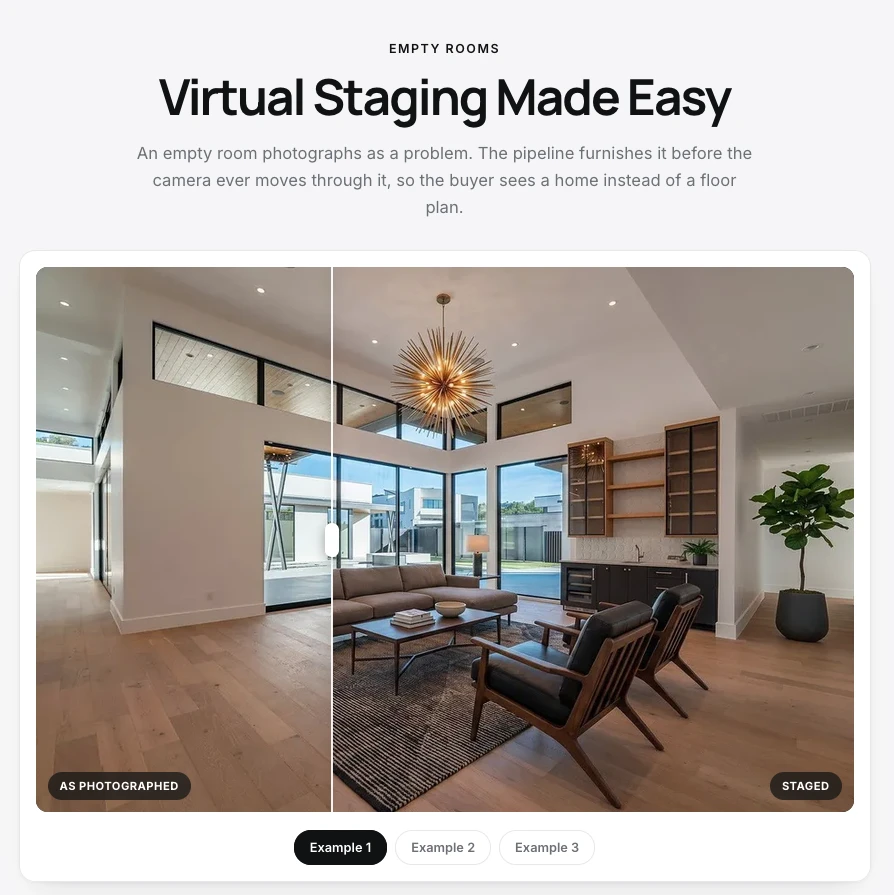
Virtual staging shows buyers the scale of an empty room, but it has to be disclosed. Most MLS systems and portals require a visible tag on the photo, such as "Virtually Staged", and a note in the listing description. Some states go further: California, for example, requires a label on any listing photo edited to add, remove or change elements, plus a link to the original. ShowcaseVideos.ai keeps the unstaged original, so you can show both versions. Its virtual staging guide covers which rooms to stage first: usually the primary bedroom and main living space.
For real estate photographers
ShowcaseVideos.ai works from photographers' photos, so it adds to a shoot rather than replacing it. You already deliver the stills, and a showcase video can become a new line on every package with no new gear. All three formats come from the same set of photos.
Where photos aren't enough
- Twilight and drone shots. AI motion can make a still feel like movement, but it can't create footage nobody captured. Large lots, acreage and views from above still need a drone.
- Outdoor staging. Staging is built for interior rooms. An empty yard or open lawn is better shown with a strong exterior photo.
- Rooms with furniture. Staging works best on rooms that are fully empty.
- URL import. Only Zillow and Redfin links import automatically. For other listings, upload the photos yourself.
- Beta. The product is in beta, so check the site for current plans.
FAQ
Can AI make a real estate video from photos? Yes. Tools like ShowcaseVideos.ai add camera motion, virtual staging, music and an address card to the listing photos you already have, and export the result in landscape, vertical and square formats.
How many photos do I need for a listing video? Ten to 15 strong photos is usually enough: one or two per room, an exterior and a closing shot. ShowcaseVideos.ai accepts up to 30.
How long should a real estate listing video be? About two minutes for the main landscape cut, and around 45 seconds for Reels, TikTok and Stories.
Do I have to disclose virtual staging in a listing video? Usually, yes. Most MLS systems and portals require staged images to be labelled, and some states have their own rules. Check your MLS's wording before you publish.
Can I try it for free? Yes. The first video is free with no credit card. It uses all your listing photos, up to 30, and carries a small watermark.
Try it
Make your first listing video free on one of your own listings. You can also view the ShowcaseVideos.ai listing on ShipBoost, browse more AI video tools, or compare online video editors.